

JEV is a TypeSafe AI model that evaluates text and returns structured decisions: a category, a scale score, or the probability of a “yes” answer. In automation, it can sort inquiries, filter messages, and select a handler. The program then runs the required branch, while a language model prepares a response if needed.
The practical benefit of JEV is processing a stream of similar messages. Instead of sending every email to a large model, you can first determine what to do with it: pass it to a manager, save it for review, or involve an AI assistant.
What is JEV in simple terms?
Imagine a dispatcher at a company's entrance. They do not write a sales proposal or solve the client's problem. They determine whether it is a sales inquiry, a payment question, a technical issue, or an inquiry that needs clarification.
You provide JEV with context — state — and questions with a specified response format. For example: “Who should handle this email?” with options “Sales,” “Support,” “Billing,” and “Other.” The program receives the selected category and numerical scores, which it uses for routing.
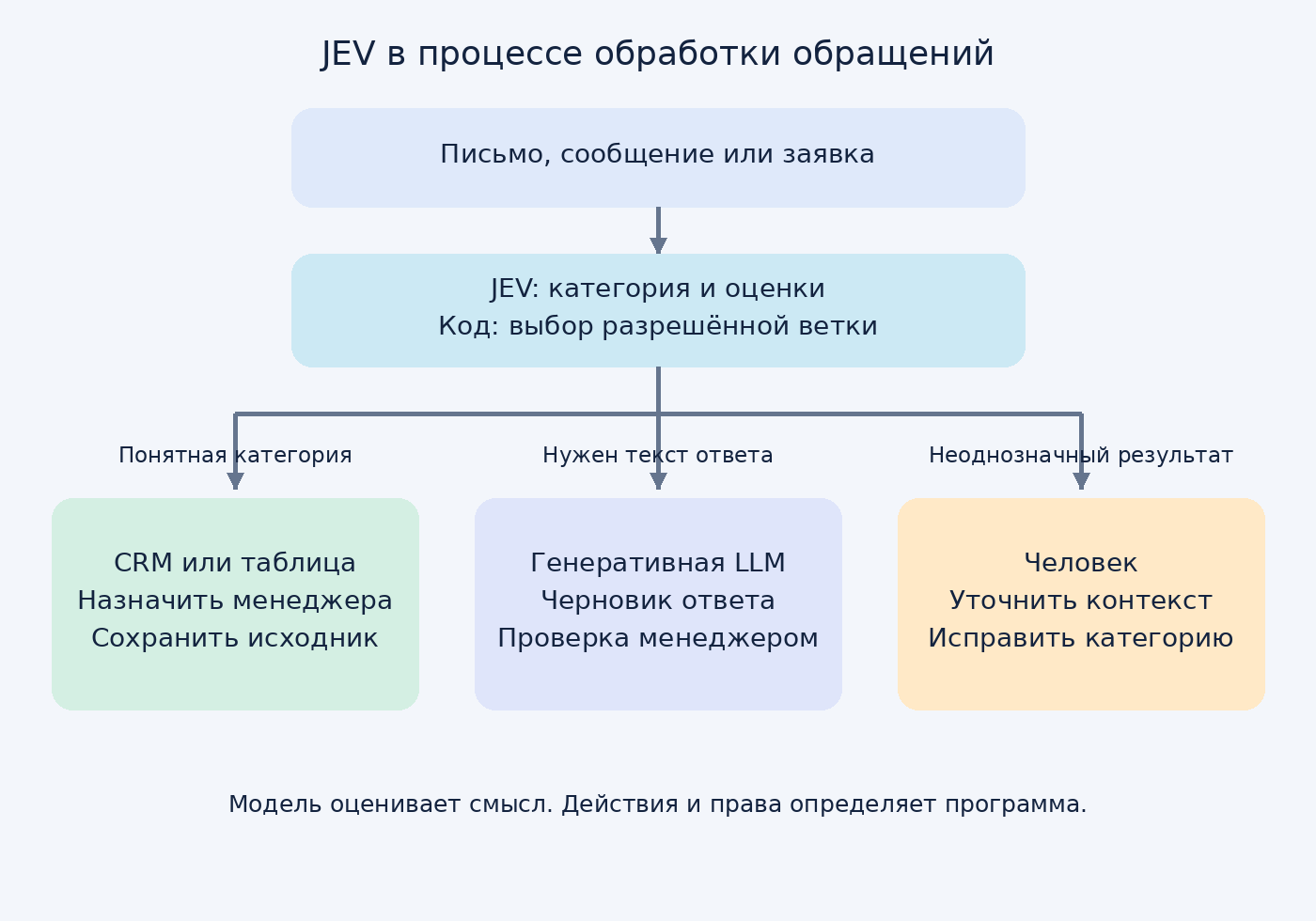
JEV works through the TypeSafe API. It is a separate process component; it does not replace a CRM, n8n, access rules, or a generative model.
How is JEV different from a regular language model?
| Task | Suitable tool | Example |
|---|---|---|
| Identify the semantic category | JEV or another classifier | The inquiry is about payment |
| Write a response | Generative LLM | Draft email to the client |
| Check the amount and date | Regular code | The invoice is 7 days overdue |
| Update a record | CRM API and business rules | Assign a responsible manager |
LLMs can also classify and return structured results. Therefore, choose JEV based on test results: quality on your messages, latency, cost, and integration convenience. The response format alone does not guarantee the correct decision.
What questions can you ask JEV?
- Choice — selecting a category. For example, the department for an inquiry. Returns the selected option, option probabilities, and confidence.
- Score — a rating on the described scale. For example, the degree of dissatisfaction: calm, annoyed, strongly negative. The result can be fractional because it takes the probability distribution into account.
- Noul — the probability of a “yes” answer. For example: “Is the author clearly looking for a contractor for automation?” Returns a number from 0 to 1; Noul has no separate confidence field.
Separate the criteria. The question “Is this a good client?” is too vague. It is better to separately check whether there is a task, whether it matches your services, and whether the author is looking for a contractor. The code then decides whether to pass it to a manager.
Practice: filtering automation leads in n8n
MVP task: receive messages from a connected source and find requests for n8n, Telegram bots, and integrations. The manager receives the original text and a link; the system does not send offers to clients on its own.
Input examples: “Looking for a specialist: Telegram leads need to be logged in a CRM” — a request for a contractor. “Built a bot, showing the result” — a post about one’s own project. “Who knows n8n?” — an ambiguous message worth checking.
Step 1. Prepare the data
Store the message ID, time, source, link, and text. Store the processing status separately. Remove duplicates by source and message ID. Send the model only the necessary context: sometimes a short reply needs the preceding question.
Step 2. Set up HTTP Request
In n8n, use HTTP Request: POST method, URL https://api.typesafe.ai/v1/systemone, Content-Type: application/json header. The Authorization header must contain Bearer and your API key; store it in Credentials. The request body is the JSON from the attached request.json file. Replace the state value with the current message text.
In the example, the model receives two questions: whether the author is looking for a contractor and which category the task belongs to. Choice includes an other option so the model is not forced to select an unsuitable service. The request uses the documented jev-1.13.0 version; if it changes, the thresholds need to be checked again.
Step 3. Route the results to branches
After HTTP Request, check the response structure and numeric values, then use Switch. The thresholds below are a starting hypothesis for testing, not the manufacturer's recommendation for all tasks.

- To the manager: asks_executor.noul ≥ 0.90, the category is among your services, and category confidence ≥ 0.80.
- To the archive: asks_executor.noul ≤ 0.10. Keep the record and review a sample of such messages to spot missed leads.
- For review: all other cases, including other and insufficient confidence in the category. A person or a separate LLM reviews them, receiving the original message and criteria.
An API error, missing response, or invalid format should also send the message to the retry or review queue. They do not mean the message is unsuitable.
Step 4. Add a useful action
For target messages, create a record in CRM or Google Sheets and send a Telegram notification. Attach the original text, link, category, and scores. If needed, use an LLM to draft a reply; leave sending it to the manager.
Such a filter can be embedded in lead processing and CRM update workflows. It is best to start with one source and one clear action.
Why doesn't 90% confidence mean no errors?
For Noul, the number reflects the estimated probability of “yes,” while for Choice and Score, confidence is calculated from the probability distribution. These are different metrics. Low confidence means the answer is ambiguous; it does not prove that the message is spam or irrelevant.
For example, for the question “Is the customer requesting a refund?” a Noul value of 0.05 means a low estimate of refund likelihood. It may be an important technical complaint. You should not discard it based on this number alone.
Even a confident answer can be wrong. A 0.90 threshold promises neither 90% accuracy on your data nor the absence of errors. The setting must account for the cost of a missed request and the cost of a false alert.
How do you validate an MVP before launch?
- Collect 100–200 real examples as a starter set. Include target requests, service ads, discussions, short remarks, and attempts to influence the model.
- Label them manually. Specify who each message should be routed to and why.
- Split the dataset into examples for tuning and a separate validation set. Do not tune thresholds based on validation results.
- Measure two types of errors: how many alerts are actually useful and how many target requests the system missed. Calculate the share requiring manual review separately.
- Run in shadow mode. Compare decisions with the manager’s work without automatically sending messages or changing important data.
- Allow limited actions after review. Repeat the evaluation when changing the model, questions, source, or language.
For Russian, Bulgarian, and English, evaluate each language separately. Good results in one language do not confirm quality in another.
How much does JEV cost and where do the savings come from?
As of October 7, 2026, TypeSafe documentation lists the price for Jev 1.13 as $0.042 per million input tokens; output tokens are free. Include both context and questions in your calculations.
Example calculation: 10,000 requests with an average billable input of 1,000 tokens equals 10 million tokens, or $0.42 per JEV. This is a rate-based calculation, not a measurement of a real workflow. Infrastructure, retries, and LLMs for disputed cases or drafts are charged separately.
If only a small portion of the flow requires writing a response, a pre-filter can reduce the number of calls to the generative model. But for a dozen messages a day, the extra component may not justify the maintenance complexity.
What limitations should be considered?
- Text input only. For images and audio, OCR or speech recognition is required first.
- No free-form generation. Delegate emails, translations, and explanations to a generative model.
- Arithmetic and date comparisons belong in code. The provider separately describes weaknesses in numerical tasks.
- Context and wording affect the result. Long irrelevant text, negations, conflicting criteria, and option order require validation.
- Incoming text may try to control the model. Check messages like “ignore the rules”. A JEV score should not itself grant permission to take actions.
Refunds, record deletion, and access changes require independent checks and permissions. Details are in the article about AI agent security.
Where should a business start?
Choose one message stream and one sorting task. Prepare labeled examples, connect JEV via n8n or Python, and compare the result with the current process. The first useful MVP is a request queue with original texts and verifiable decisions.
Discuss the MVP of a request filter with CenterAI: specify the message source, approximate volume, and the action you want to automate.
Frequently asked questions
Is it mandatory to use n8n?
No. The API can be called from Python, JavaScript, or another server-side application. n8n is convenient when the source, CRM, and notifications are already connected in a workflow.
What if a message belongs to two categories?
Define a separate Noul for each independent attribute or send the request for review. One Choice selects one option and may be inconvenient for several simultaneous topics.
Can JEV be used as the agent's only safety barrier?
For risk assessment, use it as an additional signal. Access rules, allowed operations, and confirmation of important actions must work independently of the model's response.
Sources and verification
Review date: 07.10.2026. Features and pricing have been verified against the official documentation. Thresholds, the filter example, and the MVP plan were proposed by the editorial team; no paid API calls were made during article preparation.